Ink Effect Photoshop Action for Vintage Art
If you have ever spent hours trying to clean up the jagged edges or muddy lines from an AI-generated image, you know the frustration of having a great concept ruined by imperfect execution. Early on, many artificial intelligence generators struggled to produce sharp, clean lines, and while technology has improved, some outputs still lack that crisp, professional finish required for high-end design work. This is where the Ink Effect Photoshop Action becomes an indispensable tool in your creative arsenal. It was specifically designed to rescue these usable-but-flawed images, transforming flattened JPG files into assets that look as though they were drawn with an old, leaking ink pen on pristine white paper.
Transforming Digital Noise into Classic Line Art
The core function of this action is deceptively simple yet incredibly powerful. It takes your existing image data and applies a specific set of filters and adjustments to mimic the texture and flow of traditional ink. The result is a black, inky aesthetic that carries a slightly vintage charm. Unlike standard threshold adjustments that often create harsh, blocky contrasts, this action preserves a degree of organic variation, making the final output feel hand-drawn rather than digitally processed.
What sets this Ink Effect Photoshop Action apart is its two-step workflow. The first pass converts your image into that distinctive black-on-white style. However, the magic truly happens with the second included action, which removes the white background entirely. This allows you to save your creation as a transparent PNG file instantly. For designers who need to layer elements over complex backgrounds, this transparency feature eliminates the tedious process of manually masking out white space, saving hours of labor on every project.
Why This Tool Matters for Modern Creators
In a digital landscape saturated with hyper-realistic 3D renders and glossy photographs, there is a growing appreciation for textures that evoke nostalgia and human touch. The Ink Effect Photoshop Action bridges the gap between modern generative tools and traditional illustration styles. It allows you to take a rough sketch generated by AI or a low-resolution scan of vintage ephemera and elevate it into a polished asset ready for commercial use.
This tool is particularly effective when working with images that are already in black and white or possess a line-art structure. While it can be applied to color images, the results vary significantly depending on the source material's complexity. For the best outcomes, users should focus on illustrations, sketches, or vintage-style graphics where the contrast is naturally defined. The action enhances the "leaking pen" look, adding depth and character that flat vector art often lacks.
Practical Applications Across Industries
The versatility of the transparent PNGs created by this action opens doors to a wide array of applications across personal, professional, and commercial environments. Whether you are a freelance graphic designer, a sublimation printer, or an educator creating custom teaching materials, the ability to generate high-quality ink-style overlays quickly is a significant productivity booster.
- Sublimation and Merchandise: One of the most popular uses is in the world of sublimation printing. By converting an image into a transparent ink style, you can easily overlay it onto t-shirts, mugs, and tote bags without worrying about white borders ruining the print. The vintage aesthetic pairs perfectly with cotton fabrics and rustic branding.
- Custom Photoshop Brushes: Designers can load the resulting PNGs directly into Photoshop as custom brushes. This allows you to stamp intricate, hand-drawn patterns repeatedly throughout a composition, maintaining consistency while speeding up the illustration process.
- Digital Scrapbooking and Collage: Hobbyists and scrapbookers can use these transparent overlays to add texture and interest to digital layouts. The ink effect adds a layer of realism that makes digital collages feel like physical artifacts.
- Branding and Logos: Small business owners looking for a retro or artisanal brand identity can use this action to refine logo concepts. A clean, ink-style logo often conveys craftsmanship and authenticity better than a sterile digital font.
Efficiency and Workflow Optimization
Time is a currency that professionals cannot afford to waste. The Ink Effect Photoshop Action streamlines what used to be a multi-step manual process involving levels, curves, channel mixing, and selection tools. With just a few clicks, you achieve a consistent look that would otherwise require advanced technical skills to replicate manually. This efficiency allows creators to focus more on conceptualization and less on the mechanical aspects of image processing.
Furthermore, the inclusion of a detailed .txt document and example JPG images ensures that even those new to Photoshop actions can get started immediately. The documentation walks you through the workflow, offering tips on how to adjust settings for different types of source images. This educational component is crucial for maximizing the tool's potential and avoiding common pitfalls associated with automated actions.
Strategic Considerations for Best Results
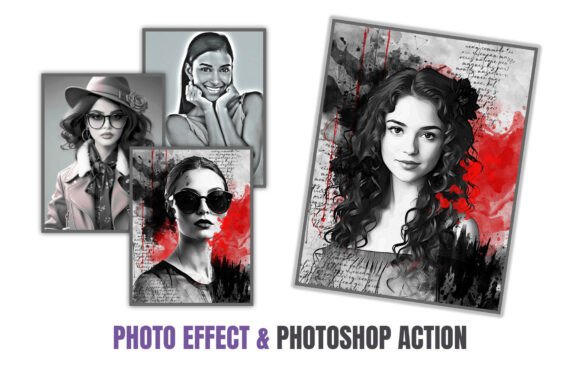
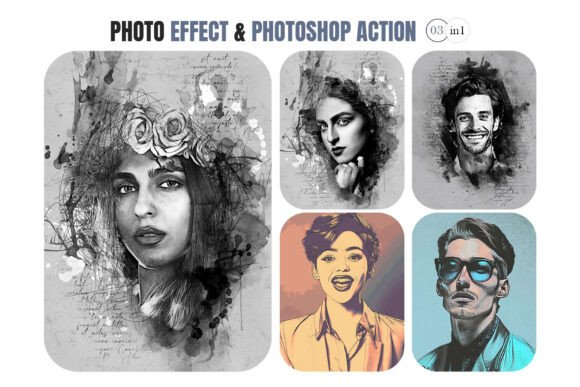
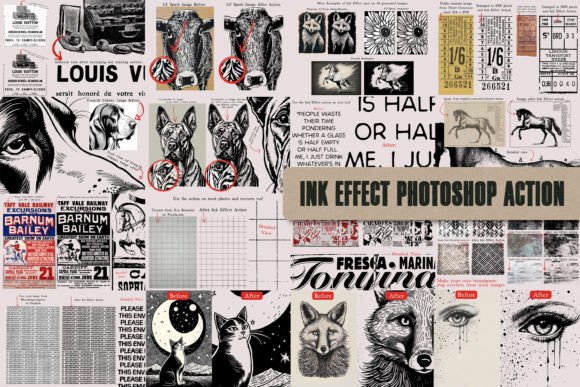
While the Ink Effect Photoshop Action is robust, it is not a magic wand that works flawlessly on every single image type. Understanding its limitations is key to achieving professional results. As noted in the preview examples, the action performs exceptionally well on line art and monochromatic illustrations. When applied to highly detailed color photographs, the conversion can sometimes result in a loss of nuance or an overly chaotic appearance.
To get the most out of this tool, consider pre-processing your images before running the action. If you are working with a color image, try desaturating it or increasing the contrast slightly beforehand. This primes the image for the ink conversion, ensuring that the lines remain distinct and the background removal is clean. Always review the preview images provided with the download to see if your specific image style aligns with the recommended use cases.
Ultimately, the value of the Ink Effect Photoshop Action lies in its ability to赋予 (endow) digital creations with a soulful, analog quality. In an era where content is king, the ability to produce unique, textured, and vintage-inspired graphics quickly gives you a competitive edge. Whether you are refining AI outputs for a client presentation or creating custom assets for your own blog, this tool offers a practical, efficient, and aesthetically pleasing solution that stands the test of time.