Evaluating the Mixed Art Effect Photoshop Action
In the realm of digital photography and graphic design, the desire to merge realistic imagery with traditional artistic styles has grown significantly. One tool designed to facilitate this fusion is the Mixed Art Effect Photoshop Action. This software automation allows users to apply complex watercolor-style transformations to standard photographs with a single click. While the promise of turning a photo into a painting instantly is appealing, potential users must weigh the efficiency of such tools against the nuances of manual artistic creation. Understanding what this action actually does, where it excels, and where it falls short is essential for making an informed decision.
Understanding the Technology Behind the Effect
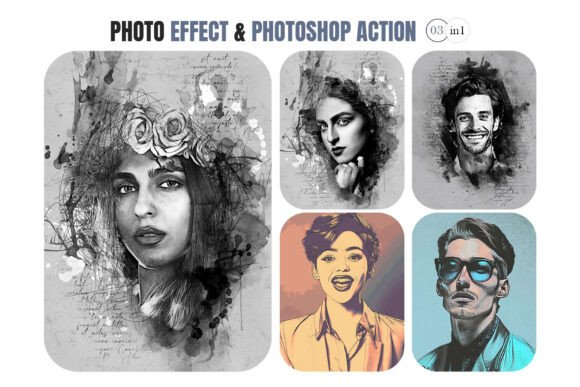
A Photoshop Action is essentially a recorded sequence of steps that can be replayed on other images. The Mixed Art Effect Photoshop Action specifically targets the aesthetic of watercolor mixed media. When executed, the action typically processes an image through a series of filters, layer adjustments, blending modes, and mask applications. These steps are programmed to simulate the fluidity of water-based pigments, the texture of paper grain, and the organic bleeding of colors characteristic of wet-on-wet techniques.
The core function is not to generate art from scratch but to reinterpret existing photographic data. It analyzes the luminance and color channels of the source image, breaking down sharp edges and smoothing gradients to mimic brushstrokes. By combining these algorithmic adjustments with pre-set textures, the action attempts to blur the line between a captured moment and a painted interpretation. For those unfamiliar with the underlying mechanics, the result often appears as a seamless blend of photography and fine art, though the process is entirely automated.
Why Users Are Drawn to Automated Art Effects
The primary driver for interest in the Mixed Art Effect Photoshop Action is efficiency. Creating a convincing watercolor effect manually requires a deep understanding of digital painting tools, including brush dynamics, opacity control, and layer masking. For photographers or designers who lack extensive training in digital illustration, the learning curve can be steep and time-consuming. An action reduces this barrier to entry, allowing users to achieve a professional-looking result in seconds rather than hours.
Additionally, there is a strong appeal in experimentation. Artists often wish to explore how their portfolio might look if reimagined through different lenses without committing to a full-time style change. Using an action provides a low-risk way to test the waters. If the result aligns with their vision, they can proceed; if not, they can simply undo the changes. This flexibility makes the tool attractive for content creators needing rapid variations for social media, marketing materials, or personal projects.
Benefits and Practical Advantages
When used correctly, the Mixed Art Effect Photoshop Action offers several tangible benefits:
- Consistency: Because the action applies the exact same set of rules to every image, it ensures a uniform look across a series of photos. This is particularly valuable for branding or creating cohesive gallery sets.
- Speed: The most significant advantage is the reduction in production time. A workflow that might take thirty minutes manually can be completed in under a minute.
- Accessibility: It democratizes high-end artistic effects, making them available to hobbyists and professionals alike who may not possess advanced painting skills.
- Non-Destructive Editing: Most well-designed actions work on duplicate layers, preserving the original photograph. This allows for easy tweaking or reverting if the initial output is unsatisfactory.
Tradeoffs and Limitations to Consider
Despite its advantages, relying solely on an automated action comes with distinct tradeoffs. The most notable limitation is the lack of nuance. Algorithms struggle to replicate the intentionality of a human artist. In a true watercolor painting, an artist decides exactly where the paint pools, where it dries light, and where the white of the paper shows through. An action applies these effects based on mathematical averages, which can sometimes result in "muddy" areas or unnatural transitions that betray the digital origin of the image.
Furthermore, the results are heavily dependent on the quality of the source image. Photos with poor lighting, excessive noise, or overly busy backgrounds often yield disappointing results when processed through a generic action. The software cannot "fix" fundamental compositional flaws; it merely applies a stylistic filter. Additionally, because the effect is preset, it lacks adaptability. If a specific area of the photo requires a different brushstroke direction or color intensity, the user must manually intervene, negating some of the time-saving benefits.
Situations Where the Action Is a Strong Fit
The Mixed Art Effect Photoshop Action is an excellent choice for specific scenarios where speed and volume are priorities. It works best for:
- Batch Processing: When a photographer needs to convert a large number of images for a themed project, such as a wedding album with an artistic flair or a travel blog post series.
- Conceptual Mockups: Designers creating mood boards or preliminary concepts can use the action to quickly visualize how a product or location might look in a painterly style before investing time in custom illustration.
- Social Media Content: Creators who need frequent, visually distinct posts can use the action to maintain a unique aesthetic without spending hours editing each individual image.
- Beginner Exploration: Those new to Photoshop can use the action as a starting point to understand layer structures and blending modes by examining the resulting file after the action runs.
When Alternatives May Be Worth Considering
There are situations where the Mixed Art Effect Photoshop Action may not be the optimal solution. If the goal is to create a piece of art intended for high-end print reproduction or sale as a fine art print, the limitations of automation become more apparent. Collectors and galleries often seek the evidence of human touch and intentional mark-making, which automated filters rarely provide convincingly.
Similarly, if the source material is complex—such as portraits with intricate hair details or landscapes with fine textures like foliage—an automated watercolor effect can obscure important details, resulting in a loss of definition. In these cases, manual digital painting using specialized brushes or hiring a digital illustrator may yield superior results. Furthermore, if a brand requires a highly specific, unique visual identity that differs from the generic "watercolor" look provided by common actions, custom development will be necessary.
Decision-Making Insights for Potential Users
To determine if the Mixed Art Effect Photoshop Action aligns with your goals, consider the following questions:
- What is my end goal? If the output is for casual viewing, web use, or quick mockups, the action is likely sufficient. If it is for commercial fine art sales, manual refinement is probably required.
- How much time do I have? Evaluate whether the time saved justifies the potential loss of artistic control. For tight deadlines, the action is a practical asset.
- Am I willing to edit the result? Treat the action as a base layer rather than a final product. Users who plan to spend additional time refining masks, adjusting saturation, and adding manual brushwork will get the best value from the tool.
- Does my source material suit the style? Test the action on a few representative images first. High-contrast, simple composition photos tend to perform better than cluttered, low-light shots.
Ultimately, the Mixed Art Effect Photoshop Action is a powerful utility for enhancing workflows and exploring creative directions. However, it should be viewed as a tool within a larger toolkit rather than a replacement for artistic skill. By understanding its capabilities and constraints, users can leverage it effectively to produce compelling visual content while knowing when to step in and add the human touch that algorithms cannot replicate.